
So, designing RPGs is kinda hard. They get even harder when you try and list out everything in plain text. I learnt this the hard way, trust me, it’s not fun. About halfway through said plain text listing, I decided that I needed a better way to do this. My solution? Google Sheets.
I’ve been pretty interested in spreadsheets for a while (super nerd), and I’ve recently gotten into the Google Scripting scene. This sounds cool, but it’s basically just Javascript with some cool APIs, so it’s not exactly rocket science. That being said, it does take a bit of time to learn those APIs and I’ll admit, I’m a complete novice with JS.
So what’s the point of all this? Why am I even writing about it? Well I’ve decided to blog my “””‘journey””” through google scripting. Documenting what I find, the issues I come across and the solutions my twisted brain decides are good ideas. This will be the first post of this… series… so it will mainly be sheet and scripting design.
RPG Design
Before making a sheet to hold all your RPG values and such, you’ll need to y’know, design the RPG. I’ll give a broad overview of the main mechanics of my RPG design here.
Classes
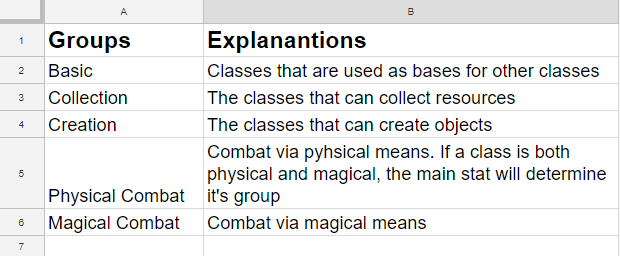
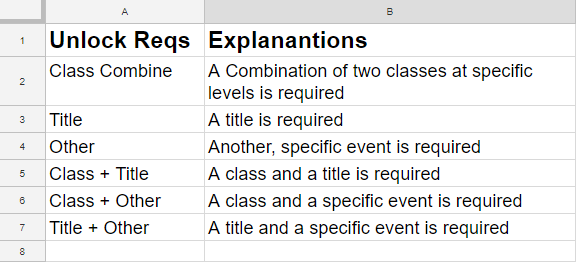
There will be a LOT of classes in this game, so I need a way of categorising them. Each class will have its own unlock requirements as well.
Tiers
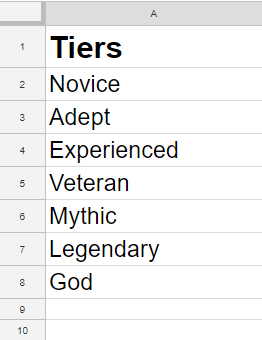
To add onto the classes, the player will be able to level up each class via class tiers based on how much the player uses each class.
Skills
The skills in this game will be broken into three groups: Might, Fleet and Mind
Elements
Each skill will have an element assigned to it. Classes will have Major and Minor elements as well.
Stats
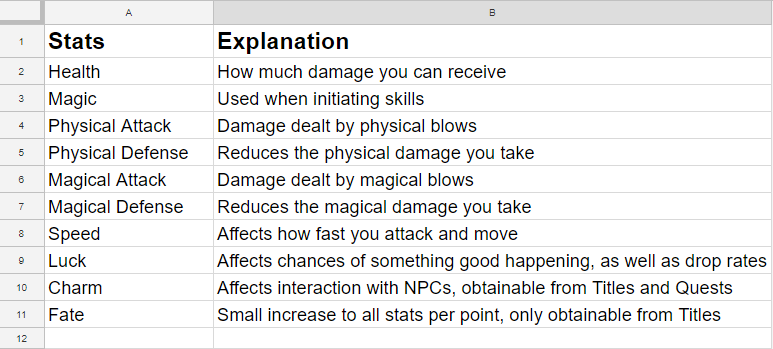
What’s an RPG without stats? These will be tied to the player character. Classes will have Major and Minor stats
Titles
One big draw to my idea is Titles. I plan on having a butt ton of them, and each title will give the player benefits be it stats, skills, classes or quests.
Ok so that’s very VERY broad, but those are the main mechanics going into my RPG. Now that we’ve gotten that down, we know what to actually do in terms of sheet design. Here are my sheet designs for these mechanics:
Elements:

Tiers:
Stats:
Class Groups:
Class Unlock Requirements:
Titles:
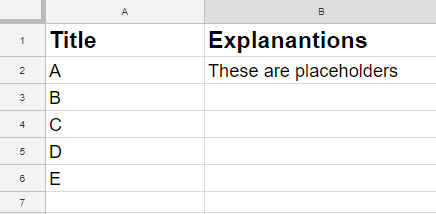
Each of these are in their own sub-sheet of the overall spreadsheet. Now that I have laid out the backend for all other mechanics, it’s time for the main attraction: the classes. This one is a LOT bigger than the others.
Classes:

So, there’s a lot of information crammed in there, but I’ve tried to seperate each major section by color. You might have noticed I didn’t create a sheet for the skills. I’ve skipped them for now, as I want to focus on the classes in the beginning. Each of the input boxes with little arrows in them are actually drop down inputs, to make it easier for the designer (me) to quickly set each class value at a glance. I’ll be going over the creation of these in the next blog post, but this post is getting a bit long, so I’ll leave it there.
No scripting this time, but it is extremely necessary to have all this stuff done BEFORE you start manipulating it via code. Trust me, I’ve done it before in some of my ‘lets get a feel for google scripting’ projects. Imagine creating code that moves a specific section of the sheet to another section. Now imagine that both sections have been completely changed; rows added, columns removed. Your code is now bork, and you’ll need to redo it. Not fun. Anyway, that’s enough rambling, see you in the next blog post.
– Liam